
Tax Strategy: Roth Conversions + Tax-Efficient Withdrawals
By Lauren Boland | March 11, 2026
Hey Proofers! I have a big feature update to share and it's one I've wanted to build for a long time. Today I'm rolling out a full Tax Strategy section with two tools that work together: Roth Conversions and Tax-Efficient Withdrawals.
If you're in FIRE or early retirement, you've probably heard that how you draw from your accounts matters almost as much as how much you have. The US tax code creates real opportunities to pay less over your lifetime, but only if you're intentional about it. These two features are designed to help you model exactly that.
Let's dig in.
Roth Conversions
A Roth conversion means you move money from a Traditional IRA or 401(k) into a Roth IRA, paying ordinary income tax on it now, in exchange for tax-free growth and tax-free withdrawals later. The classic case for doing this is the "gap years," the window between when you retire and when Social Security, pensions, or RMDs kick in. During those years, your taxable income may be unusually low, and you can fill up the lower brackets at a modest cost.
A quick example
Say you're a single filer who retired at 55 with $1.2M in a Traditional 401(k) and $300k in a Roth IRA. Your spending is $60,000/year, which you're drawing entirely from the Roth so your taxable income is near zero. The 12% bracket (2026) tops out at $50,400 of taxable income, or about $66,500 gross after the $16,100 standard deduction. If you do nothing, that cheap 12% space goes unused every year. When RMDs start at 73 with a much larger balance, because 18 years of growth happened untaxed, you may find yourself forced into the 22% or 24% bracket whether you like it or not.
A Roth conversion in year 1 of retirement might look like: convert $50,000 from the 401(k) to the Roth, pay ~$5,750 in federal taxes, and now that $48,000 grows tax-free for the rest of your life. Multiply this across a decade of gap years and the lifetime tax savings can run into six figures.
FIREproof lets you model this manually: you decide the year, the amount, and the source and target accounts, and then run the full simulation to see how it affects your projected portfolio over decades.
How to add a Roth Conversion in FIREproof
Head to the Inflows/Outflows tab and look for the Tax Strategy section. Click "Add Tax Strategy", then select "Roth Conversion".
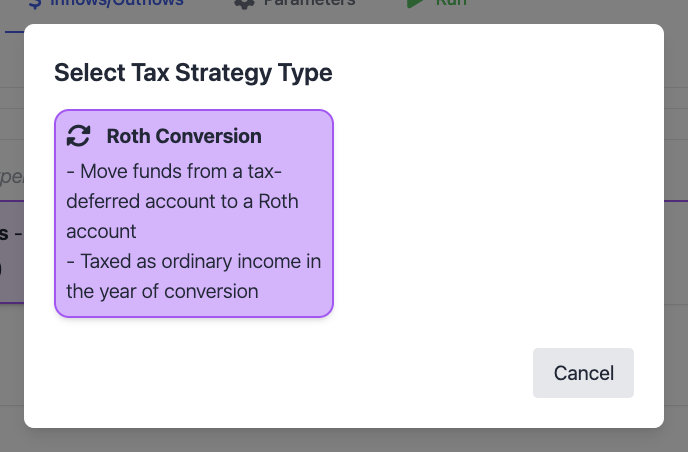
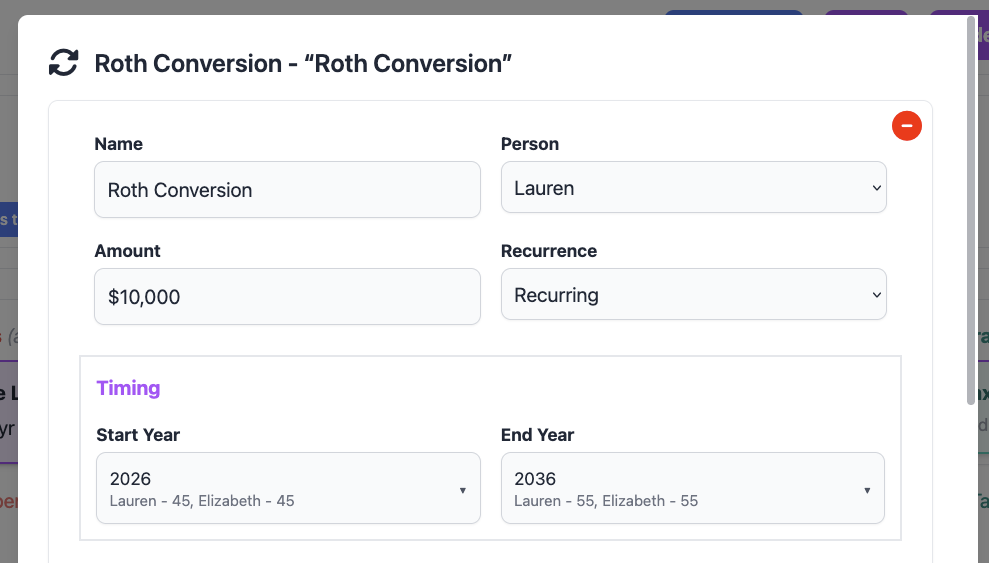
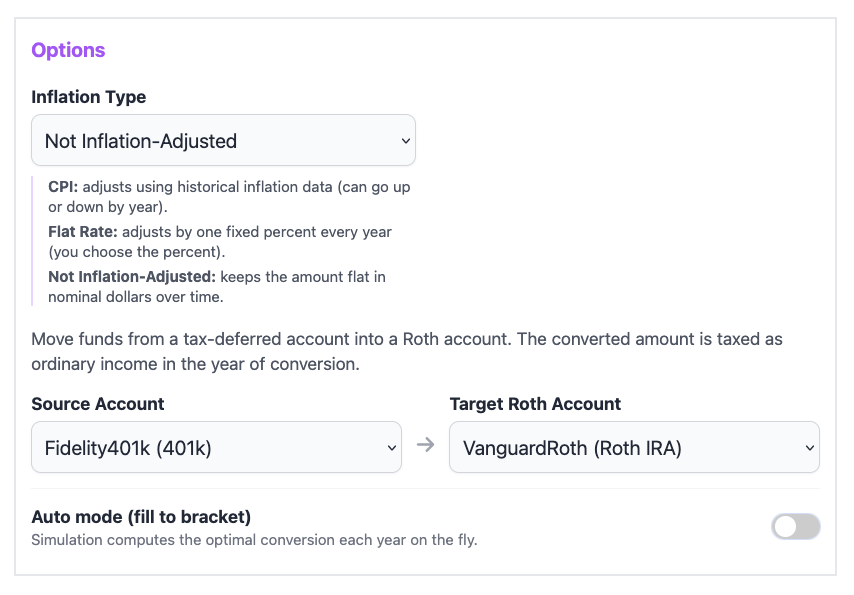
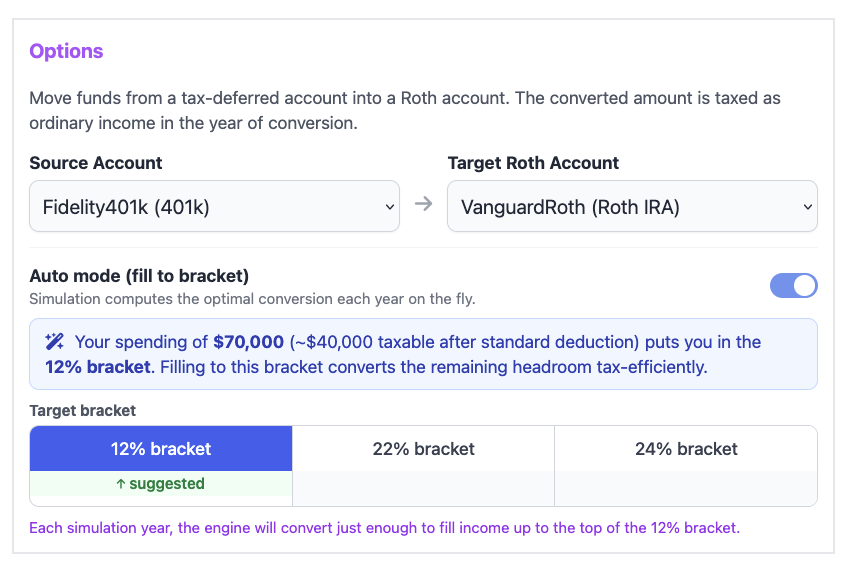
You'll specify which year the conversion happens, how much to convert (a fixed dollar amount, or you can choose "fill to bracket" to automatically top up to a specific bracket ceiling (more on that in a moment), and the source Traditional account and target Roth account.
The Bracket Progress Bar
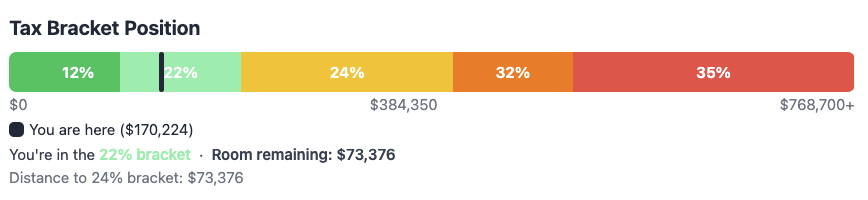
After you run a simulation, you can drill into any specific year inside the Events modal (click any year on the chart). At the top of that modal you'll now see a Bracket Progress Bar, a visual showing your projected income for that year stacked against the 2026 federal tax brackets.
This is the fastest way to see whether your Roth conversion is well-calibrated. Green means you're safely inside a bracket; a color change tells you that you're spilling into the next rate tier. If there's a lot of space left before the next bracket boundary, you might consider converting more. If you're already bumping against the ceiling, you know to back off.
With vs. Without Conversions
One of my favorite additions: in the main chart view, there's now a toggle to overlay a "No Conversions" line on the median portfolio projection. This runs a parallel simulation that strips out all Roth conversion adjustments so you can directly compare the two trajectories over time.
The gap between the two lines is the lifetime value of your conversion strategy. For some portfolios and timelines, it's surprisingly significant, even if conversions cost money in the short term, the compounding of tax-free growth can pull the "with conversions" line well ahead by the time you're in your 80s.


The Auto mode (fill to bracket)
Setting up conversions year by year can be tedious especially if you want to optimize across a 10-year window. The Roth Auto Mode automates the math. Click the fill to bracket toggle on any Roth Conversion adjustment, choose your target bracket and the year range you want to optimize, and FIREproof will:
- Use your spending amounts and Tax Status (based on number of people)
- Calculate the headroom between your projected income and the bracket ceiling you chose.
- Generate a year-by-year conversion schedule that fills that headroom exactly.
In the Proof view, you can see each Roth Conversion along with how close to the edge of the tax bracket you got.
Roth Conversion Ladder for Early Retirement
If you're planning to retire before age 59½, Roth Conversions aren't just a tax optimization tool, they may be your primary strategy for accessing retirement funds without paying the 10% early withdrawal penalty. This is where the Roth Conversion Ladder comes in.
The problem with early retirement
Most retirement savings are locked in tax-deferred accounts (Traditional IRA, 401k). If you withdraw from these before 59½, you owe ordinary income tax plus a 10% penalty on top. Roth IRA contributions (money you put in directly) can always be withdrawn tax-free and penalty-free. But Roth conversions are different, each converted amount must season for 5 years before you can withdraw it penalty-free. This is the IRS's Roth conversion 5-year rule.
How the ladder works
The strategy is straightforward: start converting Traditional IRA money into a Roth IRA every year, beginning at least 5 years before you need to spend it. Each year's conversion becomes a "rung" on the ladder, accessible penalty-free five years after it was converted. You pay the tax on conversion now (ideally in a low-income year), and in exchange you get penalty-free access to that money starting 5 years later.
A concrete example
Say you retire at 50 with $1.2M in a Traditional IRA and $150,000 in a Roth IRA ($100,000 of which is contributions you can already access freely). You need $60,000/year for spending. Here's a simplified ladder:
| Age / Year | Action | Spending source | Tranche unlocks at |
|---|---|---|---|
| Age 50 (Year 1) | Convert $60,000 from Traditional → Roth | Roth contributions ($60k drawn) | Age 55 |
| Age 51 (Year 2) | Convert $60,000 | Remaining Roth contributions ($40k) + brokerage | Age 56 |
| Age 52–54 | Convert $60,000/year | Brokerage / taxable accounts | Ages 57–59 |
| Age 55 (Year 6) | Continue converting | Year-1 tranche unlocks; spend from Roth penalty-free | n/a |
By age 55, a fully-funded ladder is running: each year a tranche from 5 years prior unlocks, and you spend it while simultaneously converting the next rung. You pay ordinary income tax on each conversion (at your low early-retirement rate), and nothing else, no penalty, no capital gains exposure.
How FIREproof models this
FIREproof tracks each Roth conversion as a separate tranche with its own 5-year clock. When the simulation draws spending from a Roth IRA before age 60, it applies the IRS ordering rules automatically:
- Contributions first - always penalty-free, drawn first
- Conversions second (FIFO) - oldest conversion first; if the 5-year window hasn't passed, the 10% penalty is applied
- Earnings last - penalized at 10% until age 60
This means your simulation results will automatically reflect higher taxes and penalties in the early years of the ladder if you try to access conversions too soon, and you'll see the penalty disappear once each tranche matures. You can use the Events modal in the Proof view to inspect any year and see exactly which tranches were drawn and whether penalties were applied.
The practical implication: if you plan to retire before 55 and rely on a Roth ladder, make sure FIREproof shows you have enough in contributions, brokerage, or maturing tranches to cover spending in the early "runway" years before the ladder is fully funded. The simulation will penalize you if you reach into a conversion tranche too early, so you'll see it clearly in your tax bill.
Tax-Efficient Withdrawals
The second tool being released is different in nature it doesn't move money between accounts proactively. Instead, it changes how much you pull from your Traditional accounts in any given spending year.
Here's the core idea: when you spend from a Traditional IRA or 401(k), every dollar you withdraw is ordinary income. If your spending is high enough to push you into a higher bracket, the marginal dollars get taxed at that higher rate. Tax-Efficient Withdrawals sets a ceiling on how much FIREproof draws from your Traditional accounts capped at the top of your chosen bracket, and routes any remaining spending to Roth or taxable brokerage accounts instead.
A concrete example
You're a single filer spending $150,000/year. Your only accounts are a $1M Traditional 401(k) and a $500,000 Roth IRA. Without any cap, FIREproof pulls the full $150,000 from the 401(k):
- $150,000 gross withdrawal → $133,900 taxable (after $16,100 standard deduction)
- $105,700 taxed at 10%/12%/22% → $17,966 owed
- Remaining $28,200 taxable at 24% → additional $6,768 owed
- Total income tax: ~$24,734
With the 22% bracket cap enabled:
- Traditional draw capped at $121,800 gross ($105,700 taxable, the 22% ceiling)
- Remaining $28,200 of spending comes from the Roth IRA, tax-free
- Total income tax: ~$17,966, saving $6,768 that year
Over 20 years of retirement, that's potentially $150,000+ in avoided federal taxes, plus the Roth balance compounds untouched for longer.
When does this help?
This feature has real impact when:
- Your spending is high enough to push Traditional withdrawals into a bracket you want to avoid
- You have a Roth or taxable brokerage account with sufficient balance to cover the overflow
- You're over 59½ (penalty-free access to your Traditional accounts), so Phase 1 draws actually happen
It has less impact when your spending already fits comfortably inside your target bracket, or when you don't have a meaningful tax-free account to draw the overflow from. In those cases, enabling it doesn't hurt anything but you won't see a meaningful difference.
How to set it up
In the Inflows/Outflows tab, look for the Tax Strategy section. You'll see a "Tax-Efficient Withdrawals" card that shows the current status (enabled or disabled). Click it to open the settings.
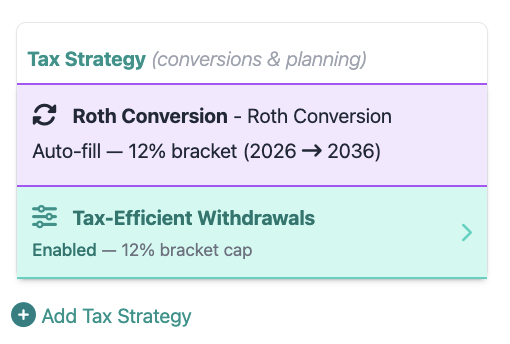
Inside the settings panel, you'll see:
- A toggle to enable or disable the feature
- A bracket selector showing all federal bracket rates (10%, 12%, 22%, 24%, 32%, 35%)
- A suggested bracket badge: FIREproof looks at your base spending and filing status to automatically recommend the highest bracket that your spending would reach without any cap
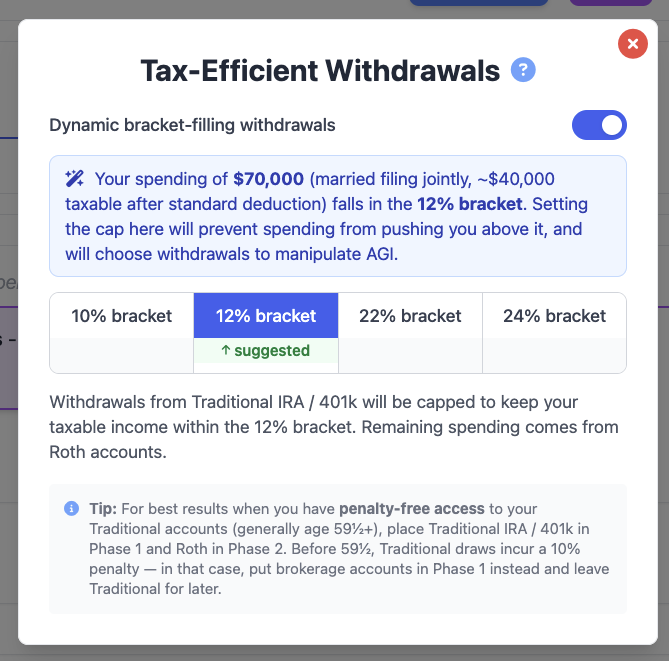
Once you save, every simulation you run will automatically cap Traditional draws at that bracket boundary and route overflow to subsequent accounts in your withdrawal order, typically Roth, then taxable brokerage.
These two tools work together
Roth Conversions and Tax-Efficient Withdrawals are solving related but distinct problems:
| Feature | When it fires | What it does |
|---|---|---|
| Roth Conversions | On a specific year you choose | Moves a fixed amount from Traditional → Roth, paying taxes now for tax-free growth later |
| Tax-Efficient Withdrawals | Every spending year, automatically | Caps Traditional spending draws at your bracket ceiling, routes overflow to Roth/brokerage |
A common strategy is to use Roth conversions during your early gap years (when income is low) to gradually drain the Traditional account, and then use Tax-Efficient Withdrawals throughout retirement to keep any remaining Traditional spending from pushing you into a higher bracket than necessary.
Neither tool is right for every situation; your account balances, spending level, timeline, and filing status all matter. That's exactly why FIREproof lets you run the numbers both ways, side by side.
-Lauren
Support this project!
FIREproof is still in Beta and I'm building it as a solo developer. A Pro subscription keeps the lights on and gets you early access to new features as they land. If you've found these tax tools useful, it's the best way to say thanks and keep this project moving forward.