Lazy Portfolios in One Click
By Lauren Boland | May 23, 2026
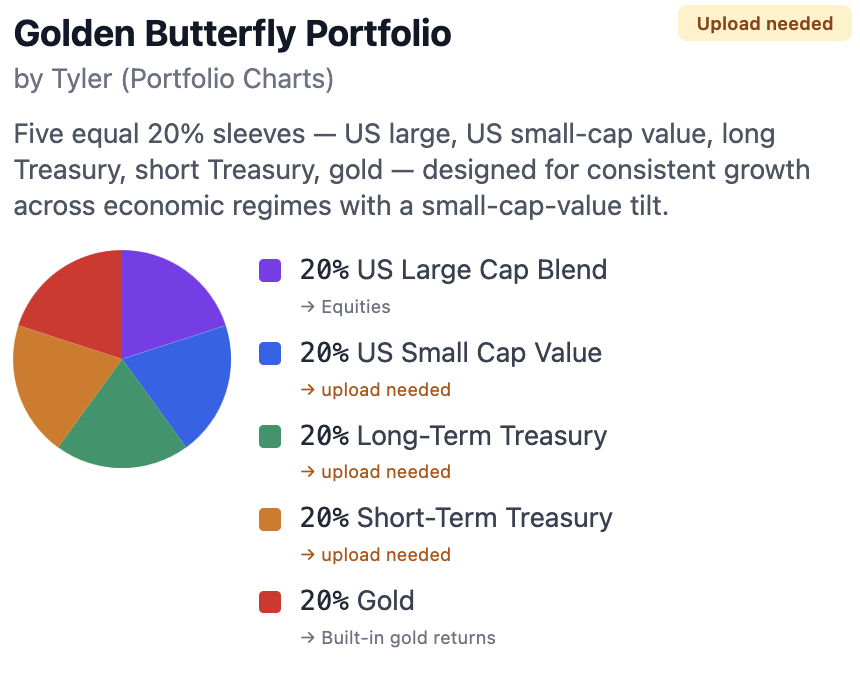
Hey Proofers! Today's release is a follow-on to the Upload Datasets feature, which brought the ability to upload dataset files to create your own assets to be used in the simulations. This release brings a curated catalog of the most famous lazy-portfolio recipes straight into FIREproof. Ten of them: Larimore's Three-Fund, Ferri's Core Four, Harry Browne's Permanent Portfolio, Ray Dalio's All Seasons, Tyler's Golden Butterfly, Larry Swedroe's Larry Portfolio, and a handful more. Pick one, confirm the dataset mapping, and apply it to a copy of your simulation in two clicks. The new sim takes on the preset's allocation, gets saved alongside your other simulations, and is fully editable. Your original saved sim stays exactly as you left it.
This is the FIREproof answer to "what if I had held the Three-Fund all along?" Or the Permanent Portfolio. Or the Golden Butterfly. You can now ask that question against any saved simulation you've already built, get a real answer with taxes, withdrawals, RMDs, Roth conversions, variable withdrawals,and keep iterating.
Why lazy portfolios
The Lazy Portfolio crowd has spent decades publishing simple, named, defensible allocations. The Bogleheads forum, the portfoliocharts.com community, and the readers of Unconventional Success are the loudest voices, but the underlying thesis is the same across all of them. Three to five sleeves, broad index funds, and a rebalance no more than once a year. Complexity is the enemy of returns, and a few canonical recipes have done well enough across a century of stock-market history that you don't need to outsmart them.
Before this feature, modeling one of those recipes inside FIREproof meant building the allocation by hand: open each account, edit the asset mix, set the glide path so the within-class weights don't drift, rinse and repeat across every account in the simulation. For a four-account household trying out the Golden Butterfly, that's 10 minutes of clicking and a real chance of a typo. And if you changed your mind and wanted to try the Permanent Portfolio instead, you started over.
Preset Portfolios collapses that workflow into two clicks: pick the recipe, confirm what each asset should map to in your datasets, and run.
The ten portfolios in the catalog
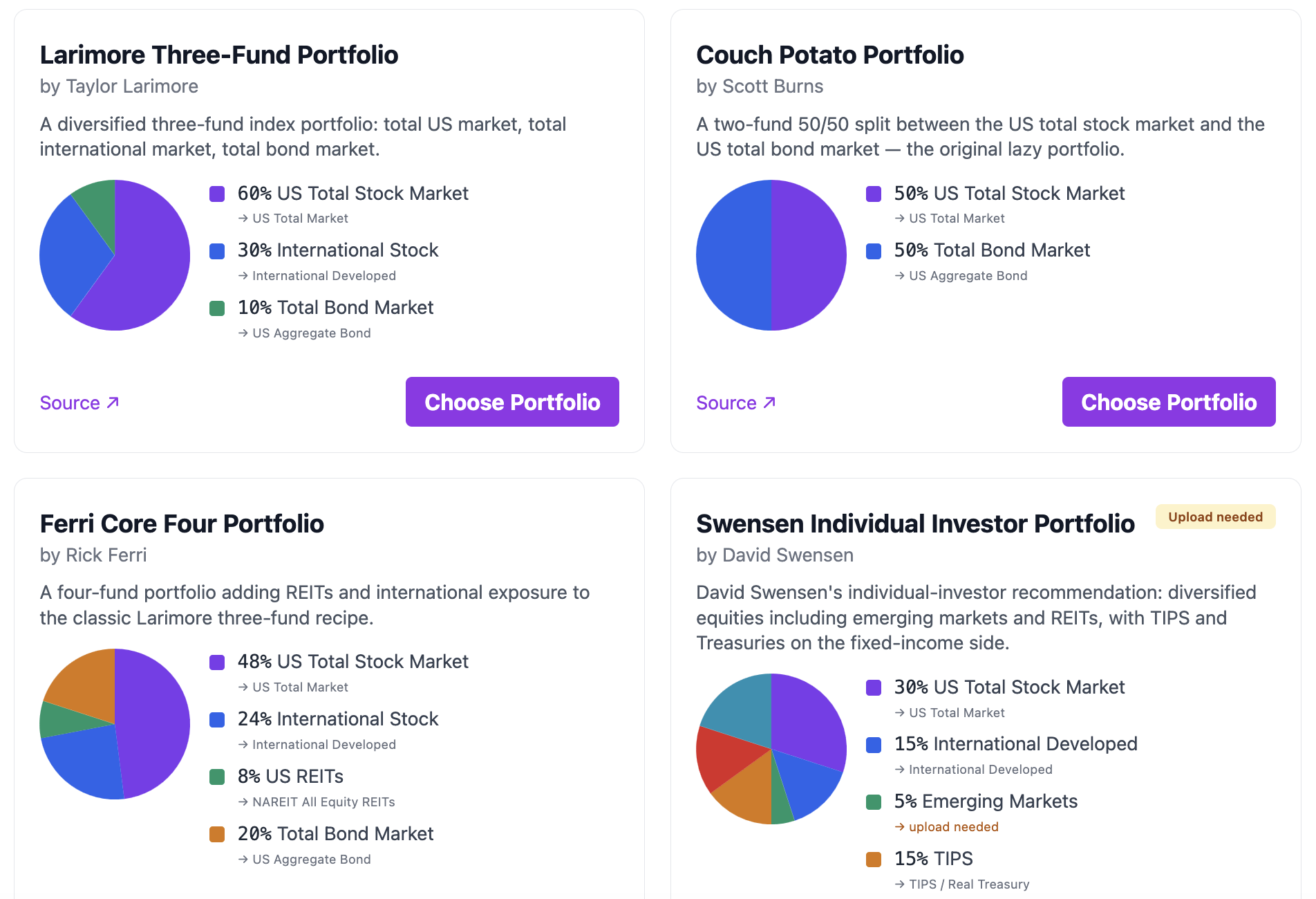
Half of them are classic index portfolios. These are the equity-heavy three-and-four-fund recipes that anyone who has spent time on a Bogleheads thread already knows by name. The other half are all-weather and risk-parity portfolios drawn from the portfolio design conversations all over the internet. They lean on meaningful gold and long-Treasury sleeves and try to diversify across economic regimes, not just across asset classes.
| Portfolio | Author | Recipe |
|---|---|---|
| Three-Fund | Taylor Larimore | US Total 60% / Intl 30% / Total Bond 10 |
| Couch Potato | Scott Burns | US Total 50% / Total Bond 50% |
| Core Four | Rick Ferri | US Total 48% / Intl 24% / REITs 8% / Total Bond 20% |
| Swensen Individual | David Swensen | US 30% / Intl Dev 15% / EM 5% / TIPS 15% / Treasury 15% / REITs 20% |
| Bernstein 60/40 | William Bernstein | S&P 500 60% / 10-yr Treasury 40% |
| All Seasons | Ray Dalio | US Large 30% / LT Treasury 40% / Int Treasury 15% / Gold 8% / Commodities 7% |
| Golden Butterfly | Tyler (Portfolio Charts) | 5×20%: US Large / US SCV / LT Treasury / ST Treasury / Gold |
| Golden Ratio | Frank Vasquez | US Growth 21% / US SCV 21% / LT Treasury 26% / T-Bills 6% / Gold 16% / Commodities 10% |
| Larry | Larry Swedroe | US SCV 15% / Intl SCV 8% / EM 7% / Int Treasury 70% |
| Permanent | Harry Browne | 4×25%: US Large / LT Treasury / T-Bills / Gold |
Green rows are the classic index portfolios. Amber rows are the all-weather and risk-parity portfolios.
Built-in slots vs. upload-needed slots
FIREproof ships with a curated catalog of historical-return series. The catalog includes the S&P 500, US Total Market, US Large Value, US Large Growth, US Small Blend, International Developed, Intermediate Treasury, 10-Year Treasury, TIPS, REITs, and a synthetic US Aggregate Bond series, all in built-in market data. It also includes gold and cash, which the engine has always supported natively. That coverage is enough to satisfy all of the slots in the Three-Fund, Couch Potato, Core Four, and Bernstein 60/40, and every slot in the all-weather presets that maps to gold or T-Bills.
Some slots in the catalog don't have a built-in match. Long-Term Treasury, Short-Term Treasury, US Small-Cap Value, International Developed Small-Cap Value, Emerging Markets, and broad Commodities are all gated behind commercial-vendor licenses that I'm deliberately not bundling. For those slots, the card surfaces an amber "Upload needed" badge, and the slot-mapping modal points you at the Custom Series upload feature so you can bring your own data.
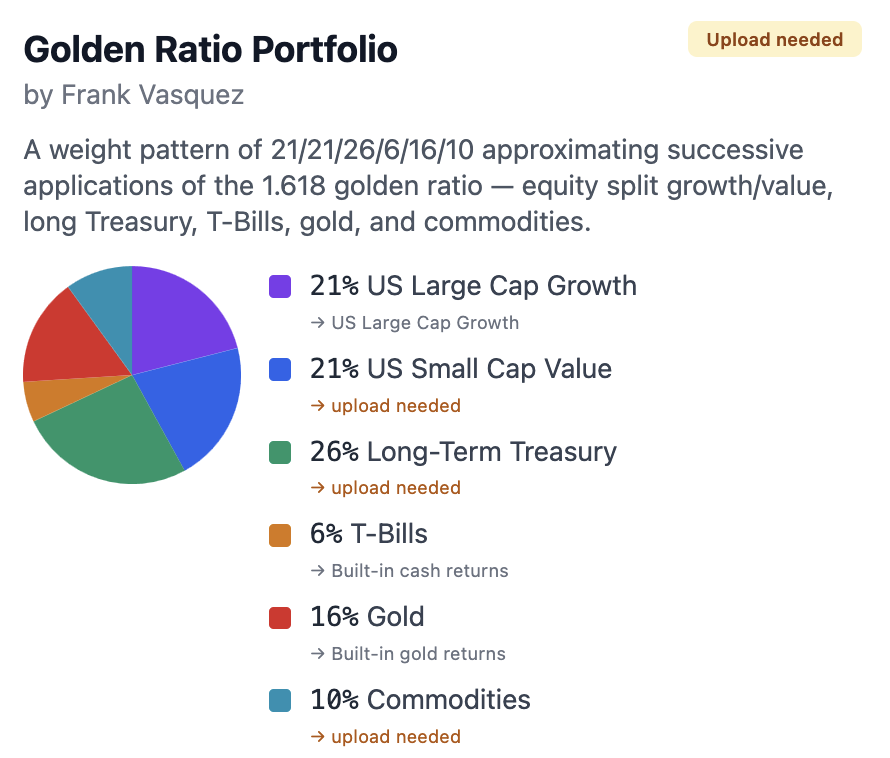
For the Golden Ratio preset, FIREproof already has built-in return data for gold and Large Cap Growth data baked in. Those slots show up with an emerald "Built-in" pill and skip the dropdown entirely. No upload required. The Golden Ratio is therefore one-click-runnable the moment you have a US Small Cap Value, Long-Term Treasury, and a broad Commodities series uploaded.
The two clicks: pick and map
The entry point lives in the sidebar under Datasets. Open it and you'll see two CTAs side by side: Upload Custom Series (which you may already know) and the new Preset Portfolios. Click into Preset Portfolios and you land on the card grid above.
Each card has a pie chart of the canonical weights, the author and a citation link, the list of slots that make up the recipe, an "Upload needed" badge if any slot can't be filled with built-in data, and a Choose Portfolio button. Click into one and a modal opens with one dropdown per slot.
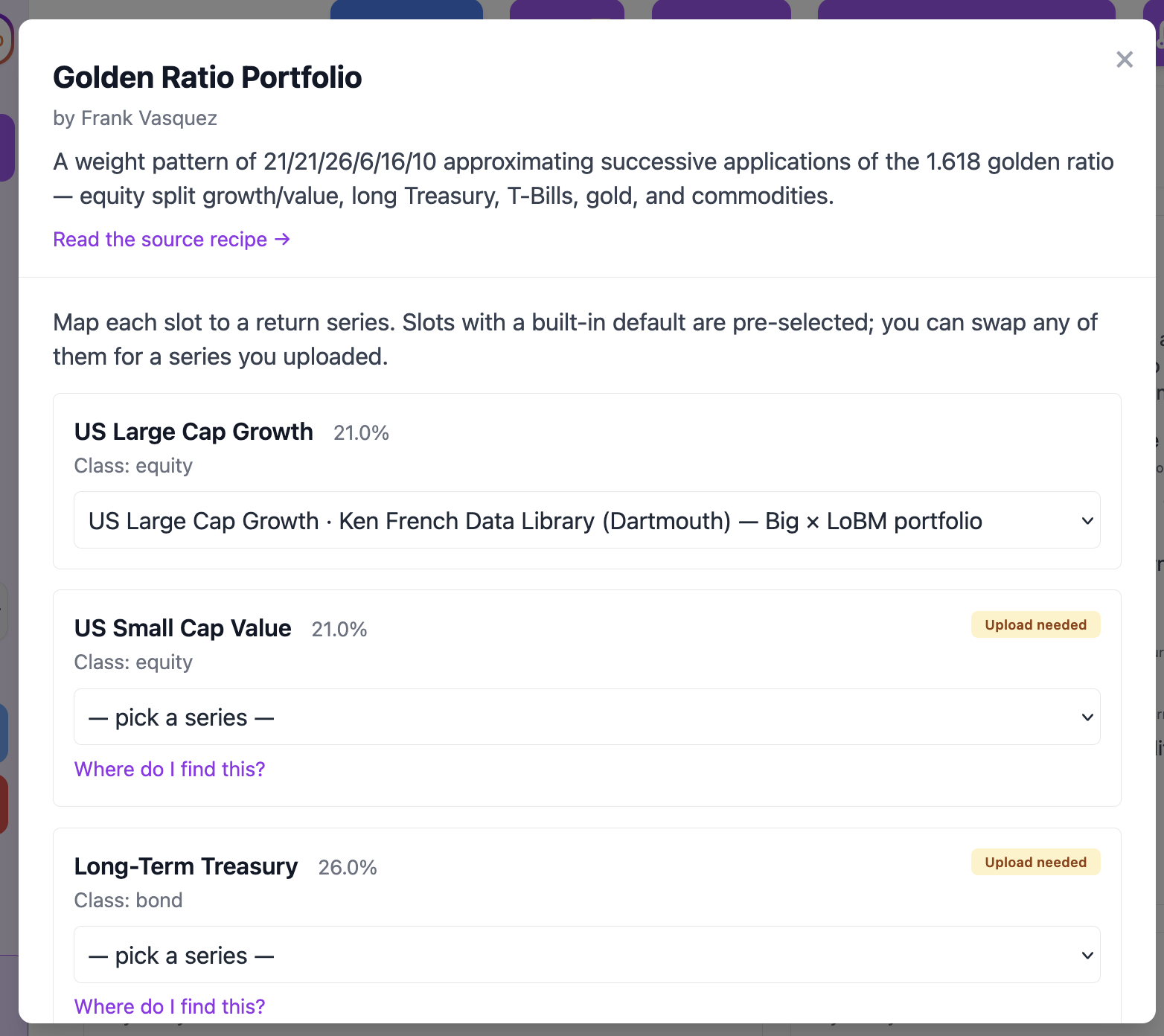
The dropdowns merge FIREproof's built-in catalog with any custom series you've uploaded, filtered to the slot's asset class. Slots with a recommended built-in (e.g. "US Total Stock Market" → `us_total_market`) pre-select to that default, so for the Bogleheads-classic presets you usually just confirm and run. Slots without a built-in match (the upload-needed ones) start empty. You pick from your uploaded series, or follow the inline link to upload one first.
Run Simulation stays disabled until every slot is mapped. Once every slot has a selection, click it.
What happens when you click Run
Three things happen in a single step:
- FIREproof duplicates your currently-selected saved simulation. Same accounts, same income flows, same spending plan, same Roth conversion ladder, same everything. Just a copy.
- On that copy, FIREproof rewrites each account's asset balances to match the preset's slot weights, preserving each account's total dollar balance. A Roth IRA stays a Roth IRA. A taxable brokerage stays a taxable brokerage. Only the within-account asset mix changes.
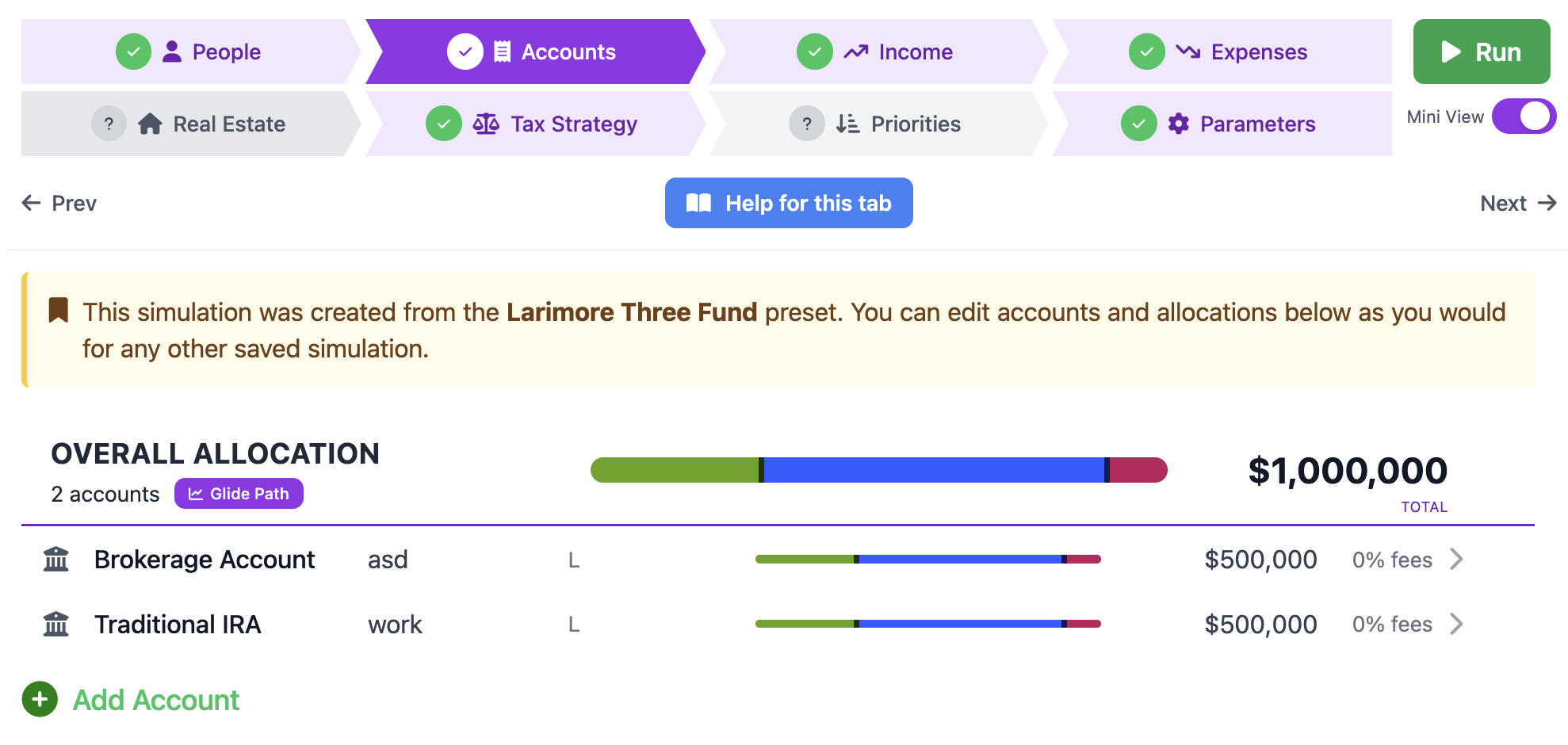
- The new allocation is saved onto the duplicate as real, editable account data. The Accounts tab shows the preset's slots directly, and every row is fully editable from the Account Allocation modal.
You land on ProofView for the new simulation, the engine runs, and you see how the recipe would have performed across whatever historical cycles your simulation is configured for.
Edit it like any other saved sim
This is the part I'm most happy about. The new simulation is a regular, fully-editable saved sim. It isn't a preview, it isn't a sketch, and it isn't a frozen demo. Click into the Accounts tab and you see the preset's slots in each account, with the same editor controls as any other simulation. Want to bump the bond weight in the Core Four from 20% to 25%? Open the allocation editor, drag the slider, save, re-run. Want to overlay a per-series glide path that tilts toward bonds as you age? You can. Want to swap your S&P 500 sleeve for a US Total Market sleeve? Edit the row and re-run.
The Accounts tab also shows a small provenance banner at the top: "This simulation was created from the Ferri Core Four preset." That label does not alter how the sim runs. If you mutate the allocation past recognition, the banner stays put as a reminder of where you started.
Compare it against your original
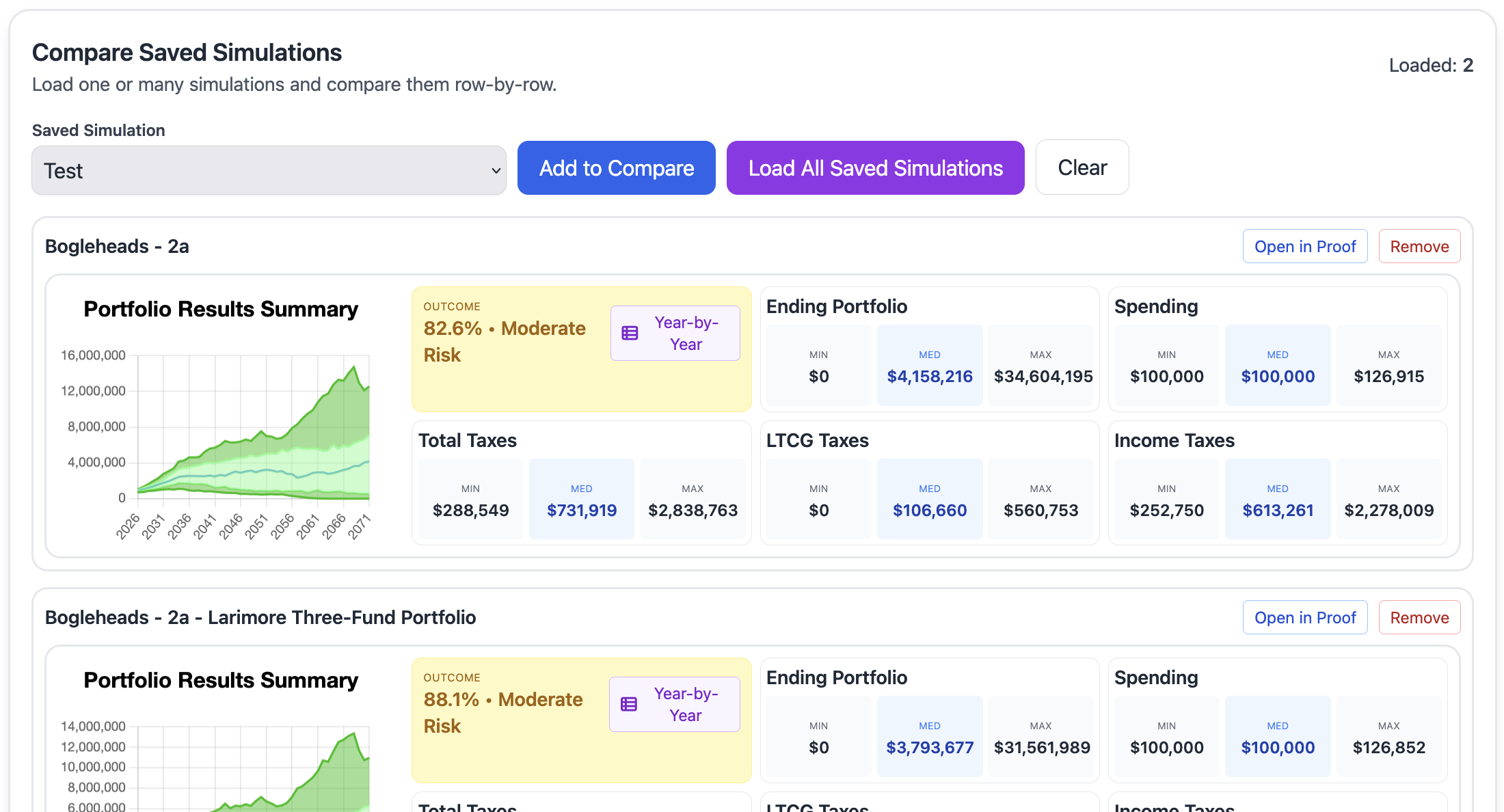
Preset runs are first-class saved simulations. They use the same model, the same persistence, and the same shape as every other saved sim. That means they drop straight into Compare Sims with zero extra work. Open Compare, pick your original plan and a preset-applied duplicate, and you get the head-to-head success rates, year-by-year portfolio trajectories, withdrawal versus income breakdowns, and median end-balance charts on top of each other.
This is, in my opinion, the most useful thing the feature unlocks. The "did the Three-Fund beat my current mix?" question has been more or less unanswerable inside FIREproof until now. Answering it used to mean maintaining two carefully-allocated saved sims by hand and trusting that they only differ in their allocation. Now you can spawn the comparison sim in two clicks and trust by construction that nothing else changed.
Where the data comes from
FIREproof's built-in series are all from publicly-accessible sources: Robert Shiller's Yale data for the long-history S&P 500 and 10-Year Treasury, the Ken French Data Library for US large value, large growth, small blend, and international developed, FRED for the intermediate-Treasury proxy and TIPS synthesis, and NAREIT for the REIT series. The new help doc at Help > Datasets > Preset Sources lists each source with a license-verification disclaimer up front.
The upload-needed slots cover Long-Term Treasury, Short-Term Treasury, US Small-Cap Value, International Small-Cap Value, Emerging Markets, and broad Commodities. For those, the help doc points you at publicly-citable academic and government sources you can verify yourself. I deliberately do not name any commercial index vendors. The redistribution rules on the major commercial indexes are unfriendly to a one-person shop. Your upload is your data, with your license, and FIREproof never republishes it.
What's next
The catalog will keep growing. Bill Schultheis's Coffeehouse, the Pinwheel, the Aronson Family Taxable, Burns's Margaritaville, Merriman's Ultimate Buy & Hold, and the 7Twelve are all on the shortlist. If there's a published, citable lazy portfolio you'd love to see in there, send it my way. I'll almost certainly add it.
The other request I keep hearing is a "save my current allocation as a custom preset" flow, so you can name your own recipe and re-apply it against future plans. That one's on the roadmap. If you'd find it useful, tell me. Your feedback shape the queue.
-Lauren
Support this project!
FIREproof is now past v1.0.0 and I'm building it as a solo developer. A Pro subscription keeps the lights on and gets you early access to new features as they land. If you've found this useful, it's the best way to say thanks and keep this project moving forward.