
FAFSA Optimizer: Plan College Aid Around Your Withdrawals
By Lauren Boland | April 27, 2026
A huge slice of the FIREproof audience is trying to retire right around the same time their kids are heading to college. Until now, the simulator could tell you whether your portfolio survives that double-spend cliff, but it could not tell you the other thing that quietly costs early retirees thousands of dollars per kid per year: how the source of your retirement withdrawals changes the federal financial aid they qualify for.
Today I'm releasing the FAFSA Optimizer. FIREproof now computes a federal Student Aid Index (SAI), Pell Grant estimate, and subsidized-loan cap for every award year your dependents are in college, using the actual income and assets the simulation produced. And it can re-route your withdrawal sourcing around your kids' FAFSA base years so the SAI on the page becomes the SAI you actually live with.
A 60-second FAFSA refresher
The FAFSA Simplification Act (effective 2024-25) replaced the old EFC with the Student Aid Index (SAI). A few mechanics that matter for retirement planning:
- Prior-prior year income. The 2026-27 award year uses your 2024 1040. In other words, the calendar year you fill the FAFSA is two years after the income year that drives it. FIREproof calls this offset the base year.
- Retirement balances are excluded from reportable assets. Traditional IRAs, Roth IRAs, and 401(k) balances do not count. Brokerage and 529 balances do.
- Roth withdrawals are not counted as income for FAFSA, but Traditional / pre-tax withdrawals and Roth conversions are. So where you pull spending money from in a base year directly moves your SAI.
- Pell Grant + subsidized loans are gated on SAI thresholds, so a few thousand dollars of SAI movement can flip a kid in or out of a real grant.
Step 1: Add your dependents
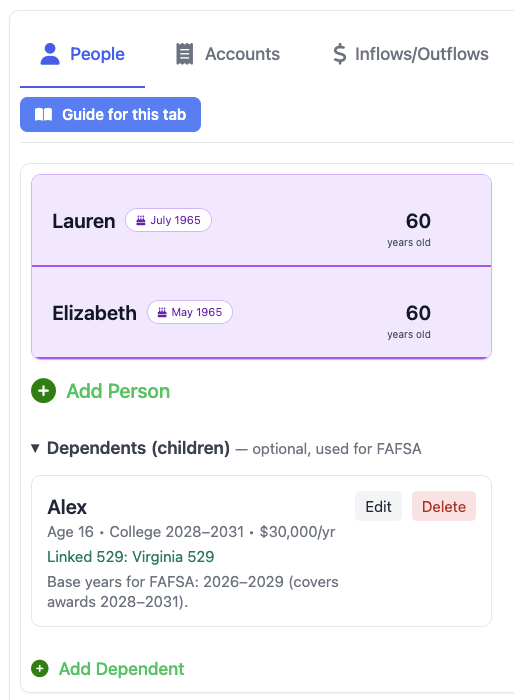
Head to the People tab. Underneath the existing person cards there's now a Dependents (children) section. Add a card for each college-bound kid: name, birth year, expected college start year, expected duration, and an annual cost of attendance. If you already have a parent-owned 529 in your accounts list, you can link it via the Beneficiary dropdown. That keeps the dependent, the 529 beneficiary, and the expected first-withdrawal year in sync.
Each dependent card surfaces a derived hint underneath the form like "Base years for FAFSA: 2027-2030 (covers awards 2029-2032)." That two-year offset trips up a lot of people the first time, so it's right there in the editor.
Step 2: Run the simulation and read the FAFSA card
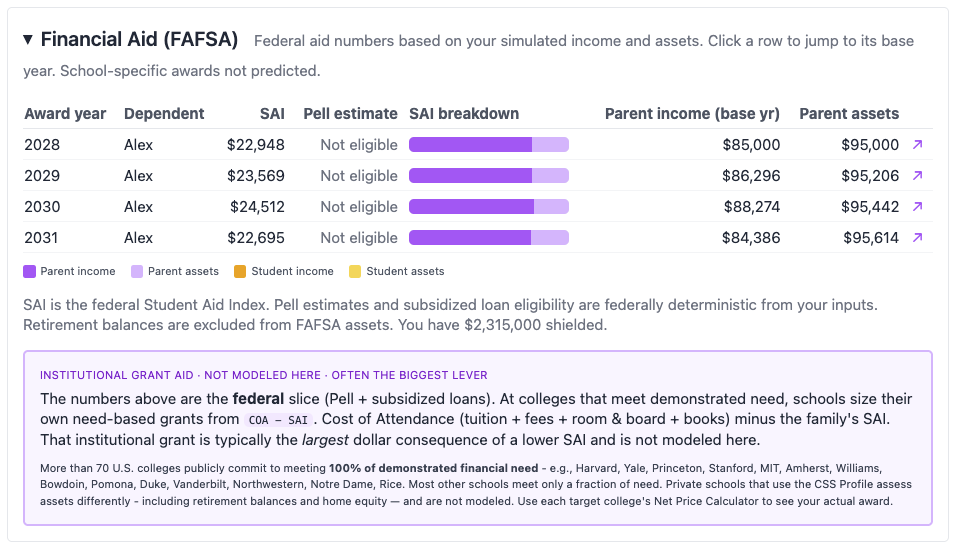
Once you have at least one dependent with a college start year inside the simulation window, run the simulation like normal. In the Proof view you'll find a new collapsible Financial Aid (FAFSA) card sitting below your tax cards. Each row is one award year for one dependent, showing:
- SAI. The Student Aid Index that every FAFSA-participating school uses to assess need.
- Pell estimate. Exact federal dollars per year, or "Not eligible" if SAI is over the threshold.
- Subsidized loan cap. Based on cost of attendance minus SAI.
- Parent income and parent assets used. The inputs that drove the result.
- Excluded retirement assets. The dollar amount of retirement balances FAFSA didn't see, surfaced so you can sanity-check.
The SAI breakdown bar
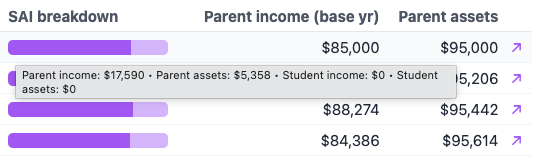
Raw dollar inputs are deceiving here, because the four FAFSA inputs hit SAI at very different rates: parent assets are assessed at 5.64%, parent income climbs progressively to 47%, student income is 50%, and student assets are 20%. A $100k brokerage balance and $100k of pre-tax withdrawals are not equivalent. The latter can be 8x more punishing.
So each award-year row has a small horizontal stacked bar showing the four contributions sized by their actual SAI impact, not raw dollars. At a glance you can see whether a high SAI is being driven by a Roth conversion you scheduled, or by the kid's part-time job, or by a 529 that's still reporting on the parents' side. Hover for the exact dollar contribution per bucket; click any row to jump straight to that award year's underlying base year in the year-by-year view.
Step 3: Optimize from the Education Expense
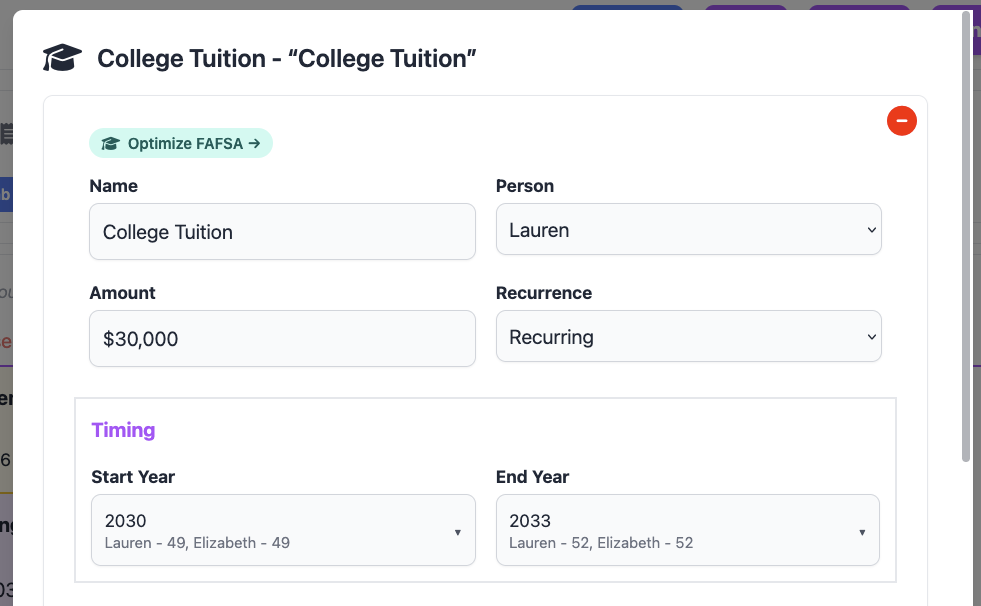
Now the fun part. On any Education Expense in the Inflows/Outflows tab, you'll see a teal Optimize FAFSA → chip on the row. It's contextual. The chip lives next to the expense it affects, not buried in a settings menu. Clicking it opens the FAFSA Optimizer modal for that dependent.
If your plan isn't ready to optimize yet, the chip changes copy to tell you why: "Add a college-bound dependent on the People tab to optimize FAFSA" if no dependent has a college start year, or "Add a Roth + Traditional account to optimize FAFSA" if you don't have both account types to route between.
Step 4: The Optimizer modal and strategy comparison
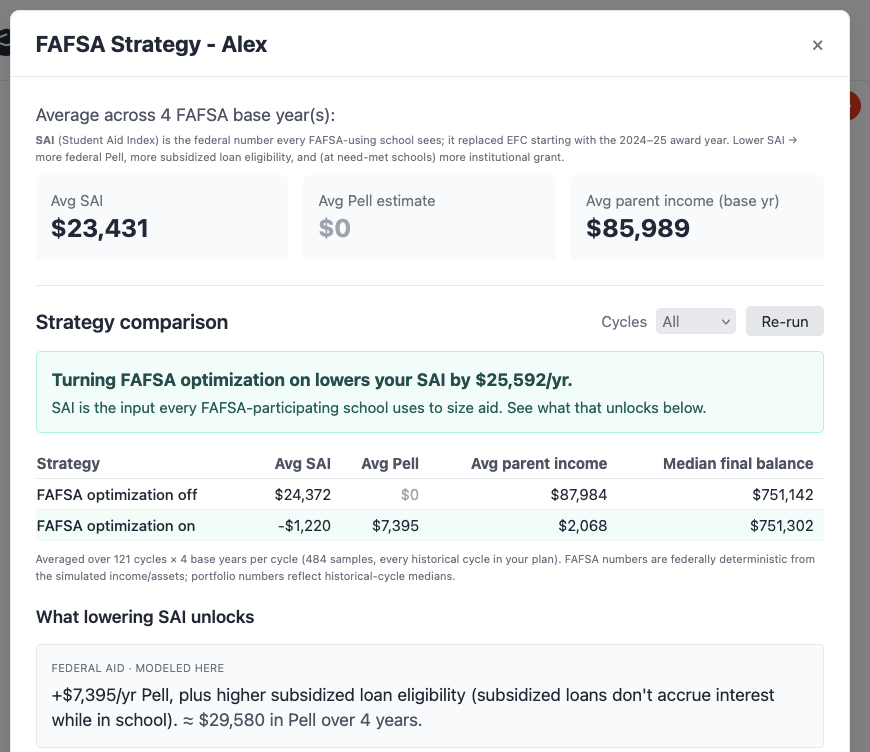
The Optimizer modal opens with a hero stat framed in concrete federal-aid terms. For example, "Drawing from Roth + Cash in your base years lowers your SAI by ~$4,200/yr. That's enough to qualify for Pell ($5,800/yr) and unlock subsidized loans." If no strategy crosses a Pell threshold, the framing falls back to the raw SAI delta.
Below the hero is the Strategy comparison block. Click Run comparison and pick a cycle count (3, 5, or 10), and FIREproof runs your saved simulation twice. Once with FAFSA optimization off and once on. Then it shows the results side by side: avg base-year AGI, avg SAI, avg Pell estimate, avg parent income, and median final portfolio balance per row, with the "on" row highlighted to anchor the recommended choice. A teal headline above the table summarizes the impact ("lowers avg SAI by $X/yr and unlocks ~$Y/yr more Pell") so you can see the aid gain and the portfolio cost of the strategy before committing to it.
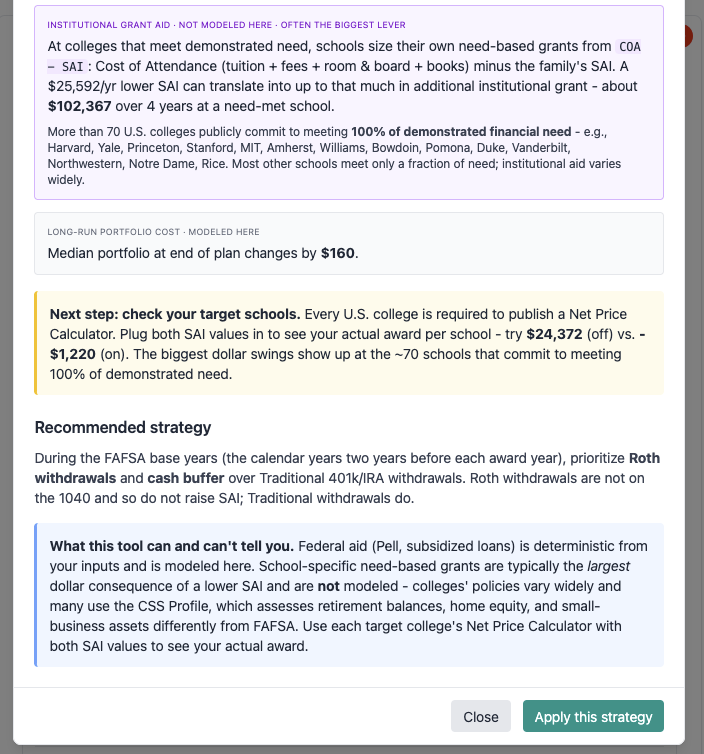
Below the comparison there's an Institutional aid sensitivity band and a federal-vs-school caveat. Need-based aid at need-met private schools generally tracks SAI, so a $4,200 lower SAI typically translates to roughly $850-$2,500 more annual need-based aid. Actual amounts vary by institution, so we keep that estimate visually secondary and clearly labeled. The main table only quotes federally deterministic dollars.
Step 5: Apply the strategy (or toggle it manually)
Hitting Apply this strategy in the modal flips the per-dependent Optimize FAFSA in base years toggle on for that kid and busts the cycles cache so your next Run picks up the new sourcing. You can also flip the toggle directly from the dependent editor on the People tab. It's the same setting either way.
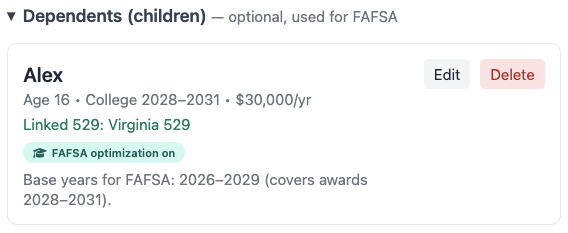
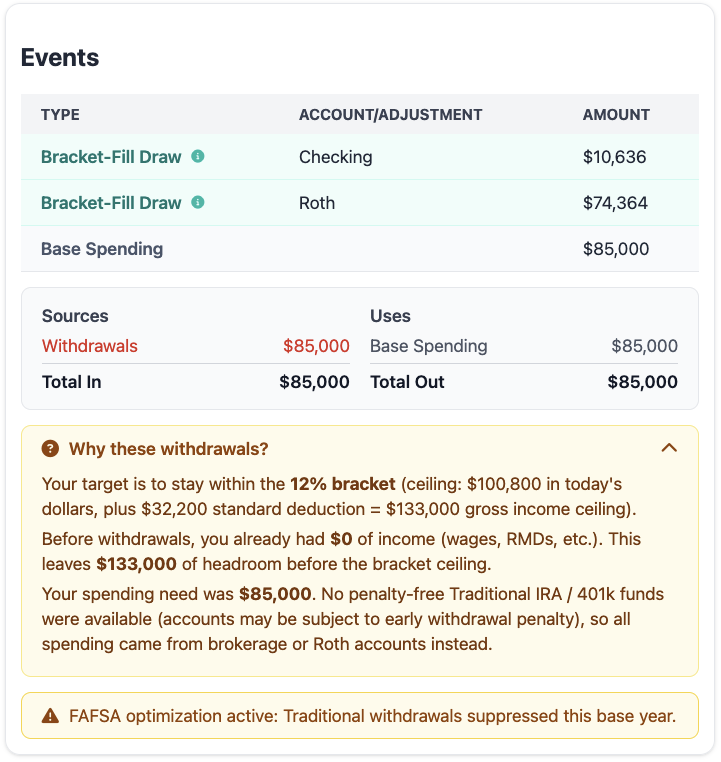
When the toggle is on, the simulation suppresses Traditional / pre-tax withdrawals during that dependent's FAFSA base years and routes spending through Roth and after-tax sources instead. Base years are the calendar years two years before each award year, since FAFSA looks back at your prior-prior-year tax return. This keeps the parent income that FAFSA sees low. Each affected base year picks up a "FAFSA optimization active: Traditional withdrawals suppressed this base year" note in the year-by-year Events view, and the dependent card on the People tab shows a teal FAFSA optimization on badge so the setting is visible without opening the editor.
A trade-off
FAFSA optimization isn't free. Suppressing Traditional withdrawals during base years means you're drawing down Roth and brokerage balances that you might otherwise have left to grow. The strategy comparison table is exactly there to show you the trade. The avg SAI/Pell improvement and the median final portfolio balance, side by side, so you can make the call with both numbers in front of you. The suppression is also a hard cap, not a soft preference: if your non-Traditional balances aren't sufficient in a given base year, the planner's fallback path will still draw from Traditional rather than fail the simulation, but the SAI improvement that year will be smaller.
What's modeled and what isn't
Some scope notes, because financial aid is a place where overclaiming would mislead people:
- Federal methodology only. We model the FAFSA, which gives you SAI, Pell, and subsidized loan cap. That's the universal number every FAFSA-participating school sees.
- CSS Profile not modeled. Roughly 200 private schools also use the CSS Profile, which assesses home equity, retirement balances, and non-custodial parent income very differently. Those awards are out of scope and we say so in the modal caveat band.
- Post-Simplification rules. No multi-child SAI discount, no grandparent-owned 529 reporting, and the new post-Simplification income protection allowance schedule. We update the FAFSA constants each year the same way we update tax brackets, so the numbers in your simulation stay current.
- Retirement-balance shielding is real. Traditional / Roth / 401(k) balances are excluded from reportable assets, and we surface the dollar amount shielded so you can see what FAFSA isn't seeing. Brokerage and parent-owned 529 balances are included.
- Today's optimizer is binary. The current toggle is off or on, and what it controls is Traditional suppression in base years. Finer-grained strategies ("Maximize Roth", "Maximize Cash buffer", "Avoid Traditional") are on the roadmap once the Cash Flow Priorities engine ships.
What's next
A few directions I'm planning to take this. First, FAFSA-aware diagnostics, which would surface automatic findings like "your 2027 SAI is within $2k of the Pell threshold; a small income shift would unlock the grant" once the Plan Diagnostics engine lands. Second, finer-grained strategy modes beyond the binary toggle, surfaced as the four-way comparison the original spec called for. Third, a richer 529 interaction view that visualizes the asset draw-down across base years. If you have a college-bound kid and a use case the current optimizer doesn't cover well, please send it my way. That's exactly the sort of feedback that drives where this goes next.
-Lauren
Support this project!
FIREproof is still in Beta and I'm building it as a solo developer. A Pro subscription keeps the lights on and gets you early access to new features as they land. If FAFSA modeling saves you even one Pell-eligible year on one kid, it's already paid for itself many times over. A Pro subscription is the best way to keep features like this one shipping.