
ACA Healthcare Subsidies: Model Your Real Insurance Costs
By Lauren Boland | March 26, 2026
Hey Proofers! This one has been a long time coming. Healthcare is consistently the #1 concern I hear from people planning early retirement, and for good reason. If you're retiring before 65 and don't have employer coverage, you're buying insurance on the ACA marketplace. The cost can vary wildly depending on your income, household size, and where you live. Until now, most people just plugged in a flat dollar estimate for healthcare spending and hoped for the best.
Today I'm releasing ACA Healthcare Subsidies, a feature that calculates your actual marketplace premium and Premium Tax Credit (PTC) subsidy for every single year of your simulation. Your healthcare costs now adjust dynamically based on your simulated income, just like they would in real life.
The ACA Healthcare Adjustment
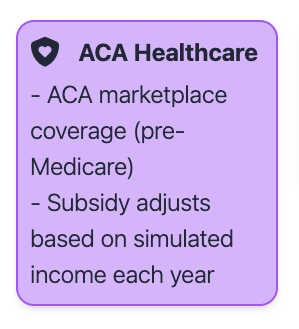
Head to the Inflows/Outflows tab and add a new expense. You'll see "ACA Healthcare" in the list with a shield-heart icon. Unlike a regular spending adjustment where you enter a flat dollar amount, the ACA Healthcare adjustment calculates your actual cost dynamically each year based on your simulated income.
Define your household
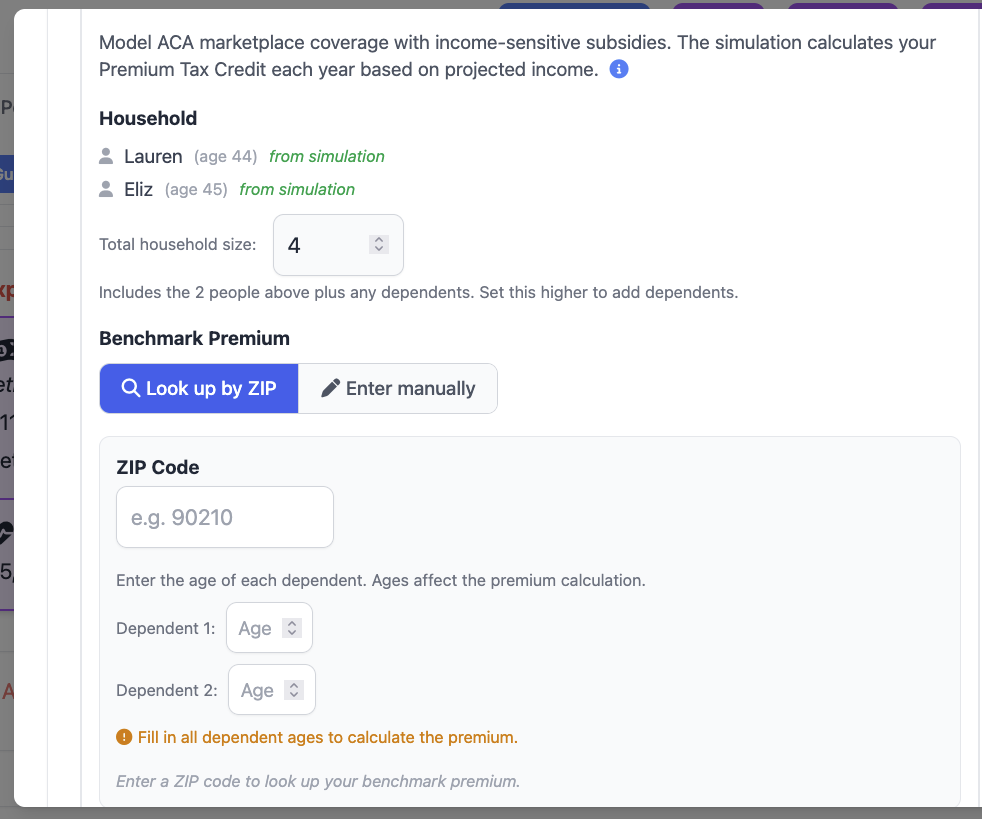
First, set your household size. The subsidy calculation depends on your total household size for tax filing purposes. FIREproof automatically pulls in the people you've already added to your simulation, and you can set a total household size that includes additional dependents. For example, if you have 2 people in your simulation and 2 children, you'd set the household size to 4. This matters because the Federal Poverty Level (FPL) thresholds scale with household size, so a family of four at $40,000 income is at a very different FPL percentage than a single person at $40,000.
Set your benchmark premium
Next, you'll set your benchmark premium. The benchmark is the Second Lowest Cost Silver Plan (SLCSP) in your area. It's the number the government uses to calculate your subsidy, regardless of which plan you actually enroll in. FIREproof gives you two ways to set this:
Option A: Look up by ZIP
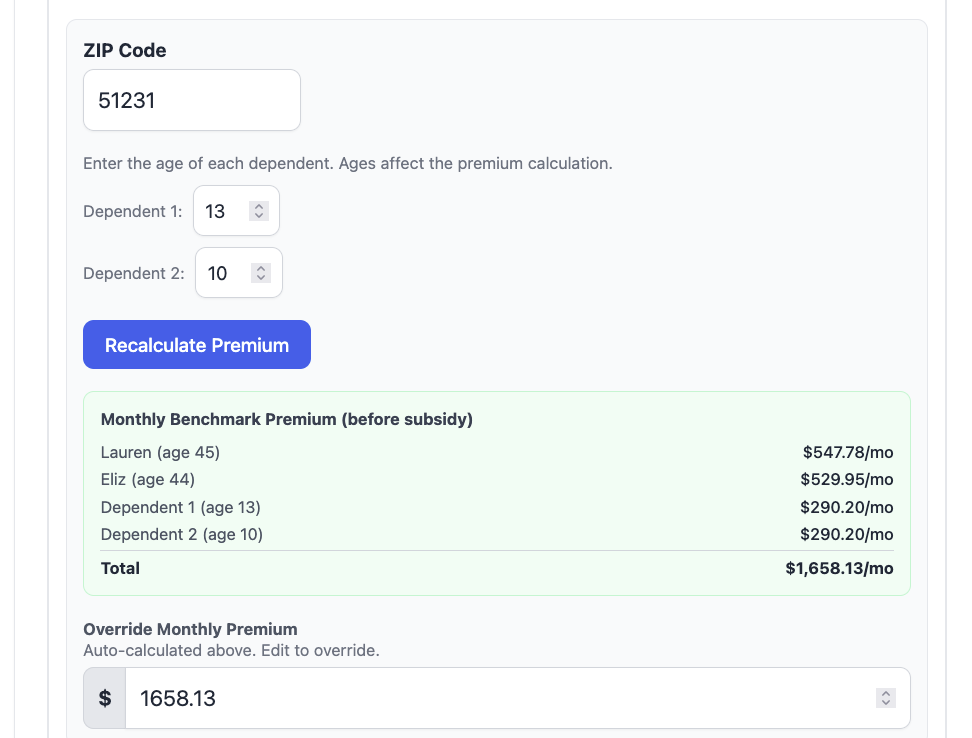
ACA premiums vary significantly by location. Choose "Look up by ZIP" and enter your 5-digit ZIP code. If you have dependents, you'll enter their ages too, since the ACA uses age-based rating for premiums. FIREproof will look up the SLCSP benchmark premium for your area and show you a per-person breakdown. You'll see which household members are rated (contributing to the total premium) and which are covered for free under the three-child rule. One important rule worth knowing: only the three oldest children under 21 are rated. Any additional younger children are covered at no extra premium cost. After the lookup, you can still override the calculated value if you have a specific plan or quote in mind.
Option B: Enter manually
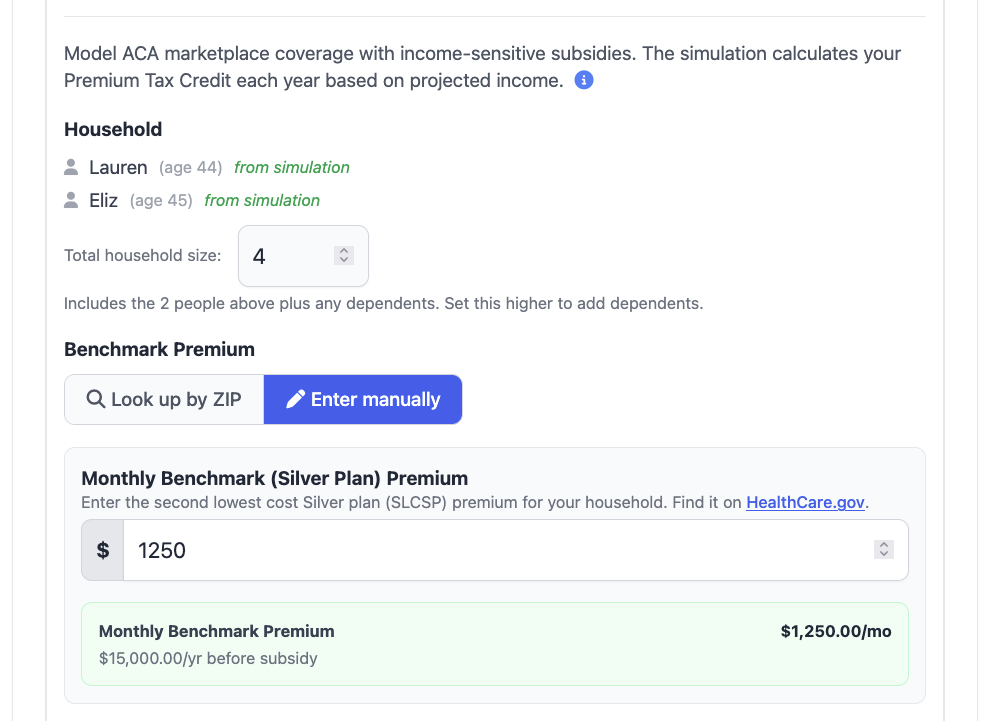
If your state runs its own exchange (like California, New York, and others) or you already know your premium, choose "Enter manually" and type in your monthly benchmark premium directly. You can find this number on HealthCare.gov. If you start with the ZIP lookup and your area isn't found, FIREproof will suggest switching to manual entry.
A couple more details worth noting: if you assign a person as the owner of the ACA adjustment, FIREproof will automatically end the adjustment when that person turns 65 and becomes eligible for Medicare. ACA premiums default to CPI + 2 percentage points of annual growth, reflecting that healthcare costs have historically outpaced general inflation. You can adjust this in the Premium Growth section to use Exact CPI, a percentage of CPI, or a different offset.
Where the data comes from
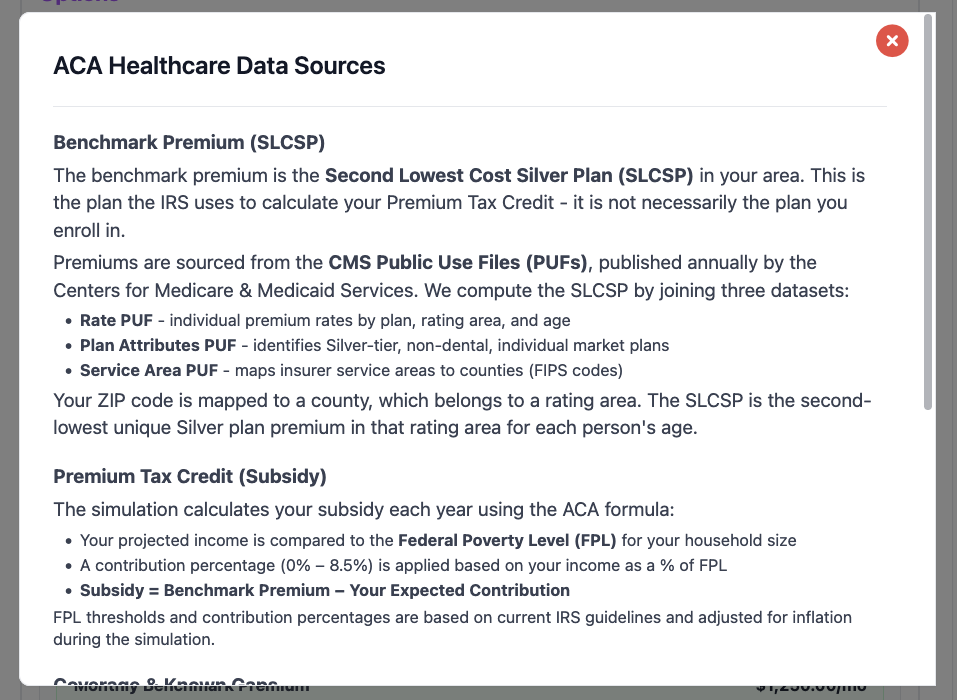
I wanted to be transparent about the data sources behind this feature, because the accuracy of the premium lookup and subsidy calculation depends on real government data.
SLCSP premium lookup
When you enter your ZIP code, FIREproof looks up the SLCSP benchmark premium using a two-tier system:
- Local database (primary): FIREproof maintains a local copy of the CMS QHP Landscape Public Use Files (PUF), which contain SLCSP premiums by county and age band for all states on the federal marketplace (HealthCare.gov). ZIP codes are mapped to counties using the HUD USPS ZIP-to-County crosswalk.
- CMS Marketplace API (fallback): For ZIP codes not covered by the local data (typically states that run their own exchange, like California, New York, and others), FIREproof falls back to the CMS Marketplace API, which provides real-time SLCSP data for all areas.
The per-person premium is calculated using ACA age-rating rules. Each person is mapped to a "PUF age band" (child rate for under 21, individual tiers from 21 to 64), and the total household premium is the sum of all rated members. As mentioned above, only the three oldest children under 21 count toward the total; additional children are free.
Federal Poverty Level (FPL) thresholds
The subsidy calculation uses the official HHS Poverty Guidelines for 2026. These are built into FIREproof for household sizes 1 through 8, with a formula for larger households ($5,680 per additional person). In future simulation years, the FPL thresholds are scaled by cumulative CPI inflation, matching how the government updates them annually.
Contribution percentage sliding scale
The percentage of income you're expected to contribute toward your premium comes from the ACA's sliding scale, sourced from IRS Rev. Proc. 2025-25 (the current 2026 plan year rules). Contribution starts at 2.10% for incomes at 100% FPL and rises to 9.96% at 300-400% FPL. Above 400% FPL, the subsidy disappears entirely. This is the "subsidy cliff" that makes income management so critical for early retirees. FIREproof uses these rates for every simulation year so you can plan around the current rules.
Seeing the results: ACA details in Events
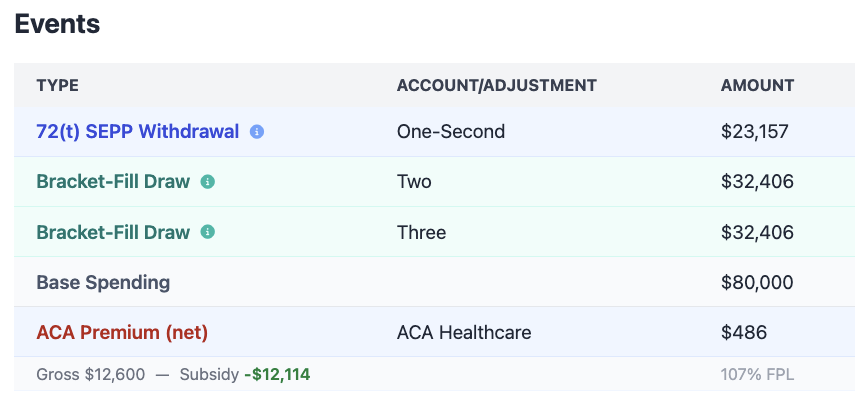
After running your simulation, the ACA subsidy information shows up in the year-by-year Events view. Click any year on the chart to open the Events modal, and you'll see a new ACA premium card alongside the other adjustments for that year.
The ACA premium card
Each year with an active ACA Healthcare adjustment gets a two-line premium card:
- Top line: Your net premium cost for the year (the amount you actually pay after the subsidy)
- Bottom line: A breakdown showing the gross premium, minus the Premium Tax Credit amount, plus your income as a percentage of FPL
This gives you immediate visibility into how much the subsidy is saving you and where your income falls relative to the poverty level. When your income is low and the subsidy is large, the net cost can be remarkably small. When your income is higher, you'll see the subsidy shrink and your out-of-pocket cost grow.
Cliff year highlighting
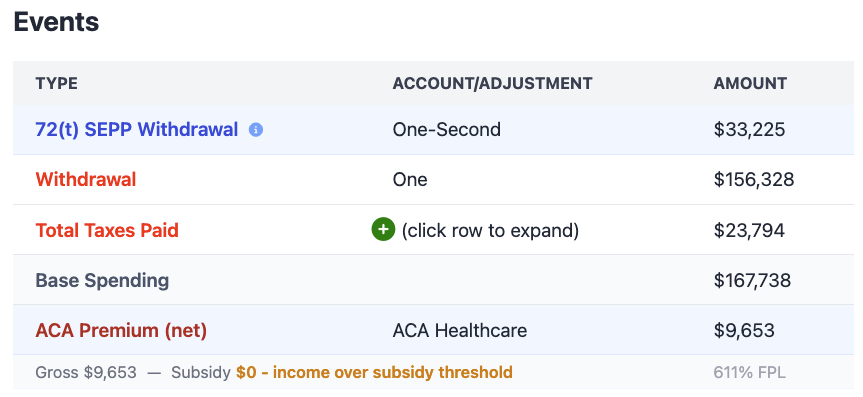
If your income exceeds 400% FPL in a year after 2025, the ACA card changes to show this in red. Instead of a subsidy breakdown, you'll see a message indicating that your income exceeded the subsidy threshold and you're paying the full gross premium. This makes it easy to spot the problem years at a glance.
Cliff warnings in the Proof view
Beyond the per-year detail, FIREproof also shows a summary warning banner at the top of the Proof view when any simulation years exceeded the subsidy threshold. This banner lists which years had a problem (up to five, with an indicator if there are more), so you can quickly see whether your overall strategy keeps you in the subsidy range or not.
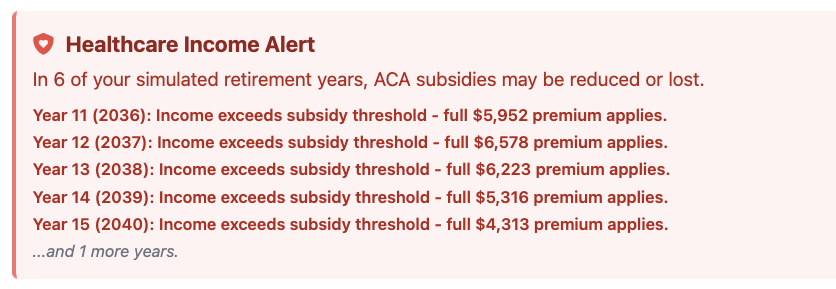
When all years stay within the subsidy range, you'll see a green checkmark instead, confirming that your withdrawal strategy kept your income low enough to maintain the credit every year.

Optimize withdrawals for maximum ACA subsidy
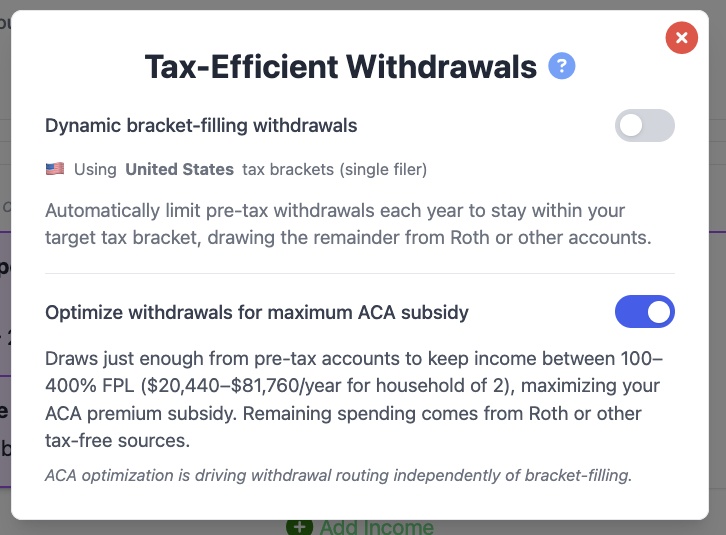
This is the part of the feature I'm most excited about. Once you've added an ACA Healthcare adjustment, you can enable "Optimize withdrawals for maximum ACA subsidy" in the Tax-Efficient Withdrawals view on the Inputs tab. This fundamentally changes how FIREproof decides where to pull your spending money from.
What it does
Normally, FIREproof withdraws from your accounts in a standard order: Traditional accounts first (since they generate taxable income either way via RMDs eventually), then Roth, then brokerage. With ACA optimization enabled, the simulation flips this strategy. It targets the 100% FPL floor as the minimum amount to draw from Traditional (pre-tax) accounts, and sets a 400% FPL ceiling as the hard maximum. The rest of your spending comes from Roth and taxable brokerage accounts, which don't count toward your MAGI.
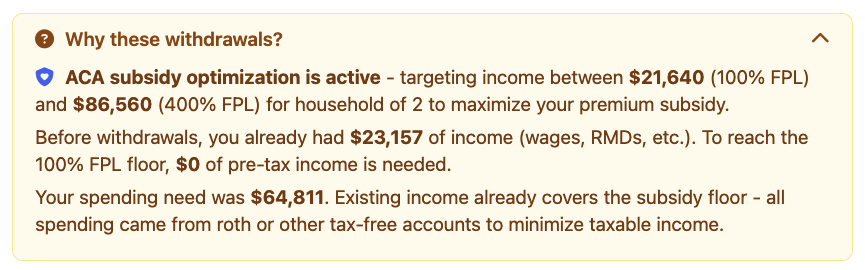
The result: your taxable income stays as low as possible, and your ACA subsidy stays as high as possible. For a household of two in 2026, the 100% FPL floor is about $22,000, and the 400% ceiling is about $88,000. If your spending is $70,000/year, the optimizer might pull only $22,000 from your Traditional IRA and take the remaining $48,000 from your Roth, keeping you near the bottom of the subsidy range where the credit is largest.
How it interacts with Tax-Efficient Withdrawals
If you already have Tax-Efficient Withdrawals (bracket-fill) enabled, ACA optimization takes priority when both are active. This makes sense: bracket-fill might target the top of the 22% bracket at around $121,000 of income, but the ACA optimizer targets $22,000. The ACA target is much more aggressive about keeping income low, and the subsidy savings usually outweigh the tax bracket savings. The Events modal will explain which strategy is active for each year, so you can see the rationale behind every withdrawal decision.
The trade-off: early withdrawal penalties
There's an honest trade-off to consider. If you're under 59 1/2 and your Roth contributions are depleted, the optimizer may need to pull from Roth conversion tranches or earnings, which can trigger the 10% early withdrawal penalty. FIREproof tracks this and will show you a warning comparing the penalty cost against the subsidy savings. In most cases where ACA optimization is beneficial, the subsidy savings (often $10,000+ per year) far exceed any early withdrawal penalties. But it's worth checking the numbers for your specific situation. You can mitigate some of these penalties with a 72(t) SEPP plan, but that is not always the case.
When to use it
ACA optimization is most valuable when:
- You're retiring before 65 and will be on the ACA marketplace
- You have significant balances in both Traditional and Roth/brokerage accounts
- Your spending would otherwise push Traditional withdrawals above the subsidy cliff
- Your SLCSP benchmark premium is high enough that the subsidy represents real savings
It has less impact if most of your money is in a single account type, or if your income from other sources (Social Security, pensions, rental income) already pushes you above the 400% FPL ceiling regardless of withdrawal strategy.
Under the hood
A few notes on how FIREproof handles the mechanics for those who want to know:
- Lagged income: The subsidy calculation uses your prior-year income (MAGI), matching how the IRS actually reconciles Premium Tax Credits at tax time.
- Year-end reconciliation: After all withdrawals are complete for a year, FIREproof recomputes the subsidy using your actual year-end income and adjusts the tax record accordingly. This catches cases where mid-year withdrawals pushed you over a threshold.
- Premium inflation: ACA premiums default to CPI + 2 percentage points, reflecting that healthcare costs have historically outpaced general inflation. You can change this in the Premium Growth section. Choose Exact CPI, a percentage of CPI, or a custom offset.
- FPL scaling: The Federal Poverty Level thresholds inflate with CPI each year in the simulation, matching how the government updates them annually.
- Medicare auto-end: If a person owner is assigned, the adjustment automatically stops when they reach age 65.
What's next
Healthcare planning is one of the most complex parts of early retirement, and this feature is a big step toward modeling it realistically. I'm already thinking about future enhancements like Medicare Part B premium modeling (IRMAA surcharges based on income) and HSA contribution optimization. If you have ideas or feedback, I'd love to hear from you.
-Lauren
Support this project!
FIREproof is still in Beta and I'm building it as a solo developer. A Pro subscription keeps the lights on and gets you early access to new features as they land. If you've found this feature useful, it's the best way to say thanks and keep this project moving forward.